
New Update: Verify Your Heliocare Oral Supplements with MyUBAT
There’s a new way to verify the KKM hologram on your Heliocare Oral supplements.
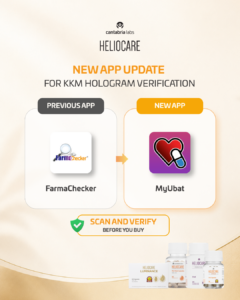
If you previously used the FarmaChecker app, please take note: KKM hologram verification has now moved to the MyUBAT app.
What Has Changed?
Previously: FarmaChecker
Now: MyUBAT
With MyUBAT, you can scan the KKM hologram sticker on your Heliocare Oral supplement packaging as part of your product verification.
Why Should You Verify?
With supplements increasingly available through different online channels, it is important to know what you are purchasing.
Counterfeit or unauthorised supplements may raise concerns such as:
- Unknown or undeclared ingredients
- Ingredient amounts that differ from what is stated
- Manufacturing, storage or quality concerns
Taking a few moments to check your product can help you make a more informed purchase.
How to Check Your Heliocare Oral Supplement
Before purchasing or consuming your Heliocare Oral supplement:
1. Check for the KKM hologram sticker on the packaging.
2. Use the MyUBAT app to scan and verify the hologram.
3. Check the MAL product registration number printed on the packaging.
4. Purchase from authorised Heliocare clinics and retailers whenever possible.
Already Have a Heliocare Supplement Without a Neoasia QR Sticker?
Don’t worry.
You may notice that some older Heliocare Oral supplement batches have a Neoasia QR sticker, while newer batches no longer carry this sticker.
Both packaging versions can be authentic.
The Neoasia QR sticker should therefore not be used as the sole way to determine product authenticity. Refer to the relevant Malaysian registration and verification details on the packaging.
Scan. Verify. Before You Buy.
The app may have changed, but the message remains simple:
Take a moment to verify your Heliocare Oral supplement before you buy.
For KKM hologram verification, use the MyUBAT app instead of the previous FarmaChecker app.